Store pages

Privacy policy generator: a first draft for your store to review

Shoppers and the law expect to know what you do with their details. Tell StoreDesk what your store collects and why, and it drafts a plain-language privacy page for you to check with a professional before it goes live.

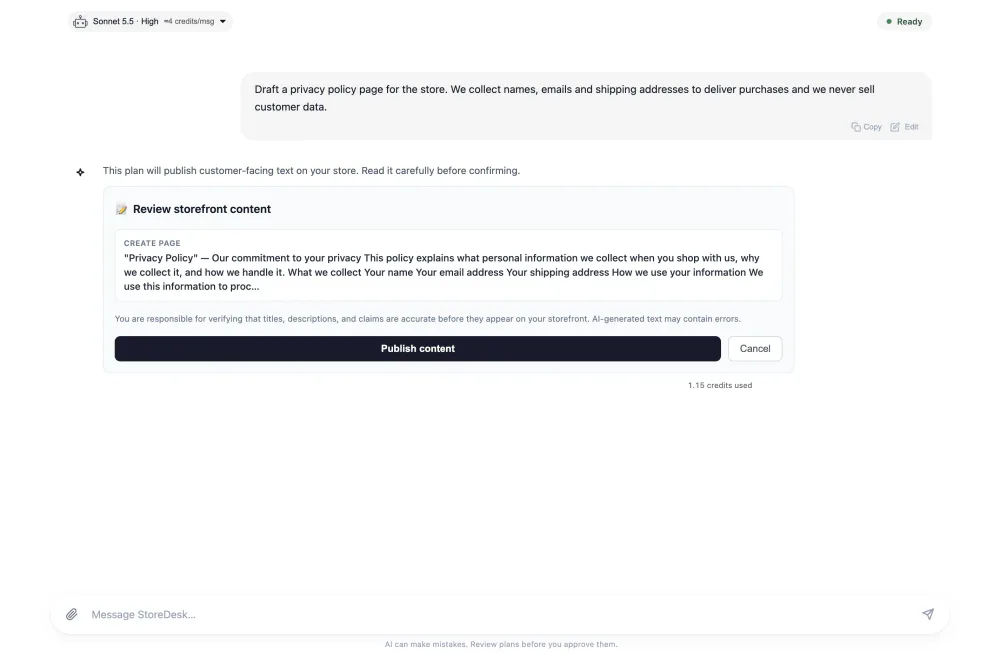
StoreDesk review card for a new Privacy Policy page drafted from a short note on the names, emails and addresses the store collects, with a Publish content button

01Overview

Privacy policy generator in StoreDesk

StoreDesk works as a privacy policy generator inside your Shopify admin, with one important difference from a template site: it writes from what you tell it about your store. You describe the data you collect, why you collect it and who you share it with, and it drafts a store page in plain language.

Treat the result as a first draft to review with a professional, not legal advice. Privacy rules differ by country and state, and only you know every app and service that touches your customers' data.

The page waits in a review card until you approve it. StoreDesk creates a regular store page; it doesn't fill the policy settings in your admin.

How to create a privacy policy for an online store

A store privacy policy explains, in words a shopper understands, what personal information you collect, why, and what they can do about it. Before you use any privacy policy maker or template, write down your real practices. The policy is only as accurate as that list.

Most store policies cover the same ground:

  • What you collect: names, emails, addresses, order details
  • Why: to deliver orders, answer questions, send emails people asked for
  • Who you share it with: payment, shipping, email and analytics services
  • How long you keep it and how shoppers can ask for a copy or deletion
  • How to contact you about privacy

A privacy policy maker that starts from your facts

A privacy policy template gives everyone the same words. StoreDesk starts from yours. For example: "Draft a privacy policy page for the store. We collect names, emails and shipping addresses to deliver purchases and we never sell customer data."

It turns that into sections such as what we collect and how we use your information. If you use an email marketing tool, a reviews app or a pixel for ads, say so in your request, because it can't see which services your store uses or what they collect. In our demo store this page used about 1.2 credits on the default model.

Terms and conditions for an online store

Terms and conditions, or terms of service, set the rules of buying from you: pricing errors, payment, delivery, returns, limits of liability and which law applies. They're a separate page from your privacy policy.

StoreDesk can draft a terms page the same way, from the rules you give it. Because terms are a legal agreement, the same rule applies, only more so: it's a first draft for a professional to check, not a terms and conditions generator you can rely on without review.

What StoreDesk doesn't do

It doesn't give legal advice or tell you which laws apply to you. It doesn't scan your store for the apps and services that collect data, and it can't check your draft against your customer records: StoreDesk doesn't read your customers' names, emails, phone numbers or addresses. It creates a store page but doesn't change the policy settings in your admin, add a cookie banner or link the page in your footer.

What it does is take the slow part, the first readable draft, off your plate, and wait for your approval before anything reaches your storefront. Approved pages can be undone from Settings > AI change history for 30 days.

02How it works

How to use privacy policy generator in 4 steps

What you ask StoreDesk, what it shows you and what you approve, in order.

  1. List your real practices

    What you collect, why, which services handle it, how long you keep it and how shoppers can reach you.

  2. Ask StoreDesk for the page

    In Store Agent: "Draft a privacy policy page for the store" followed by your list.

  3. Read the review card

    Check the title and opening, or ask for a hidden page so you can read the full text in your admin.

  4. Review with a professional

    Have someone who knows the law where you sell check it, then publish and link it in your footer.

04Get started

Try privacy policy generator on your store

Add StoreDesk to your store and ask for privacy policy generator in plain English. Nothing changes until you approve the plan.

05FAQ

Privacy policy generator questions

Answers to common questions about privacy policy generator in StoreDesk.

Still have a question?

Write to us and a person answers.

How do I create a privacy policy for my online store?

List what personal data you collect, why, who you share it with, how long you keep it and how shoppers can contact you, then turn that into a plain-language page. StoreDesk can draft the page from your list, and a professional should review it before it goes live.

Do I need a privacy policy for my store?

Almost certainly, if you collect names, emails or addresses, which every store taking orders does. The EU's GDPR requires you to tell people how you use their data, and California's online privacy law (CalOPPA) requires a posted policy on sites that collect personal information from California residents. Check the rules where you and your customers are.

Can AI write a privacy policy?

AI can write a useful first draft, but not one you should publish unchecked. StoreDesk writes only from the practices you describe: it doesn't read your customers' personal details or know every service your store uses, so review the draft with a professional.

Do I need terms and conditions for my online store?

It's strongly advised, even where no law demands it. Terms set the rules for orders, payment, delivery, returns and liability, which helps when a dispute comes up. StoreDesk can draft them from your rules as a first draft for a professional to check.

What should store terms of service include?

Who you are and how to contact you, how orders and pricing work, payment, delivery, returns and refunds, intellectual property, limits of liability and which law applies. Your refund and privacy pages can be linked rather than repeated.