AI product descriptions

Bulk product description generator: one request, one review

Products with thin or missing descriptions add up fast. Name them in one request, read every new description in one review card, and publish them together or not at all.

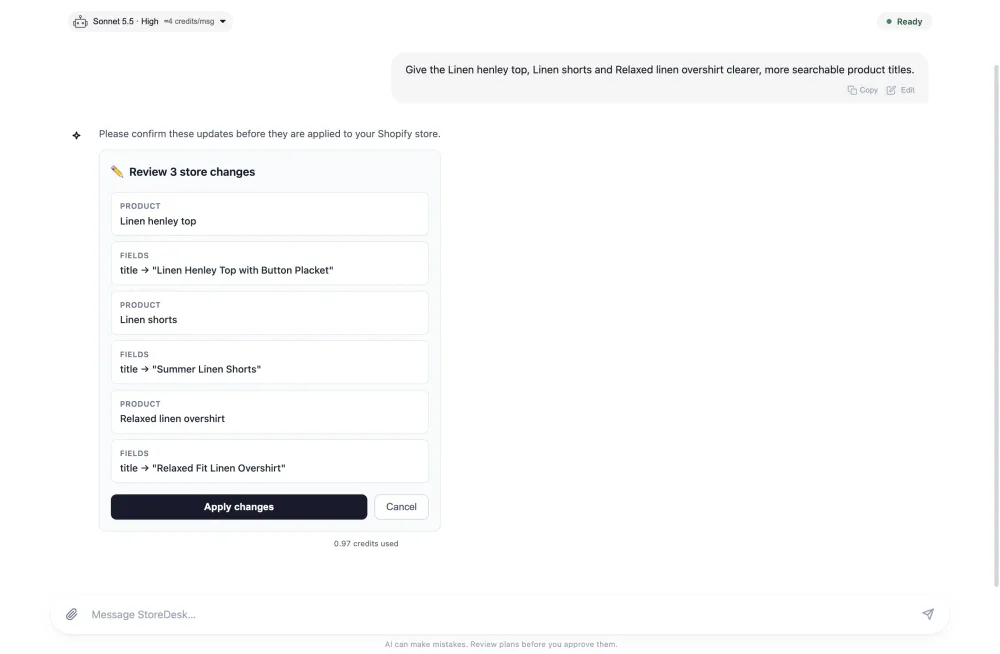
StoreDesk review of short descriptions written for five linen products at once, listed in one plan with a Publish content button

01Overview

Bulk product descriptions in StoreDesk

StoreDesk is a bulk product description generator that works from the Store Agent chat inside your Shopify admin. You name the products, it writes a short, factual description for each, and the whole set comes back in one review card. Press Publish content and they're saved; press Cancel and nothing changes.

It's for the moment you look at your catalogue and see a row of products with one-line or empty descriptions, or none at all. Instead of opening each product, you ask once and check the drafts together.

Each description is built from that product's title, options, variants and tags, plus any facts you add. StoreDesk can't read the description text already on a product, so a rewrite is a fresh draft.

Generate product descriptions in bulk for the products you name

Start with a list. "Write a short description for each of these products: Linen camp collar shirt, Drawstring linen pants, Linen tablecloth, Linen lumbar cushion and Linen hand towel" gives StoreDesk exactly what to work on. A tag or product type works too ("every product tagged bedding"), and so does "every product without a description", since StoreDesk can see which descriptions are empty.

Use exact titles or handles. StoreDesk keeps up to 200 products in view and looks up the rest by handle or exact title. When a name is vague, like "the shirt", it asks you to pick rather than guess.

  • A list of exact product titles
  • A tag or product type they share
  • Every product with an empty description
  • Vague names get a question, not a guess
Give it the facts once

A description is only as good as the facts behind it. StoreDesk uses each product's real options, so sizes and colours come out right, but it can't know the weave, the weight or the care label unless you tell it.

Type the shared facts in your request ("all of these are 100% linen, machine washable at 30 degrees") or attach your supplier's spec sheet as a PDF, DOCX or TXT file. It writes only what it can work out and leaves out anything it can't back up.

Review every description before it publishes

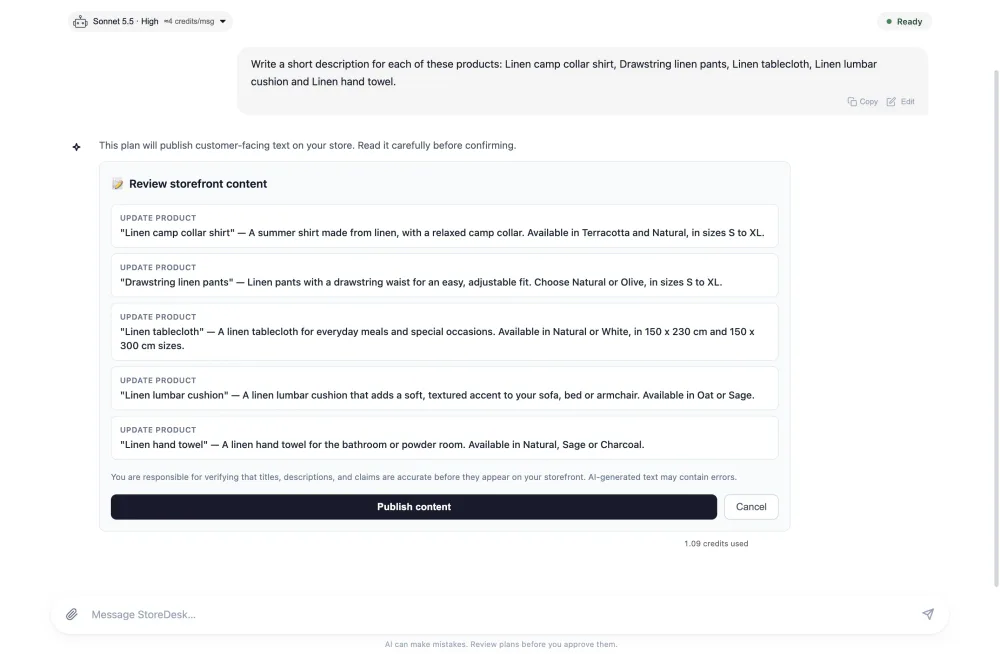
Every bulk AI product description shows in the review card under the product it belongs to, with a reminder that you're responsible for checking claims. If a draft contains phrases like "only 3 left", "#1 best seller" or fake reviews, the card adds a warning.

Those warnings are simple pattern checks, so read each line. The card holds the set together: Publish content saves all of them, Cancel saves none. To change one, cancel and ask again with your correction.

StoreDesk
StoreDesk review card with a new description for the Linen tote bag, a note that you must check claims, and Publish content and Cancel buttons

Improve product descriptions and titles together

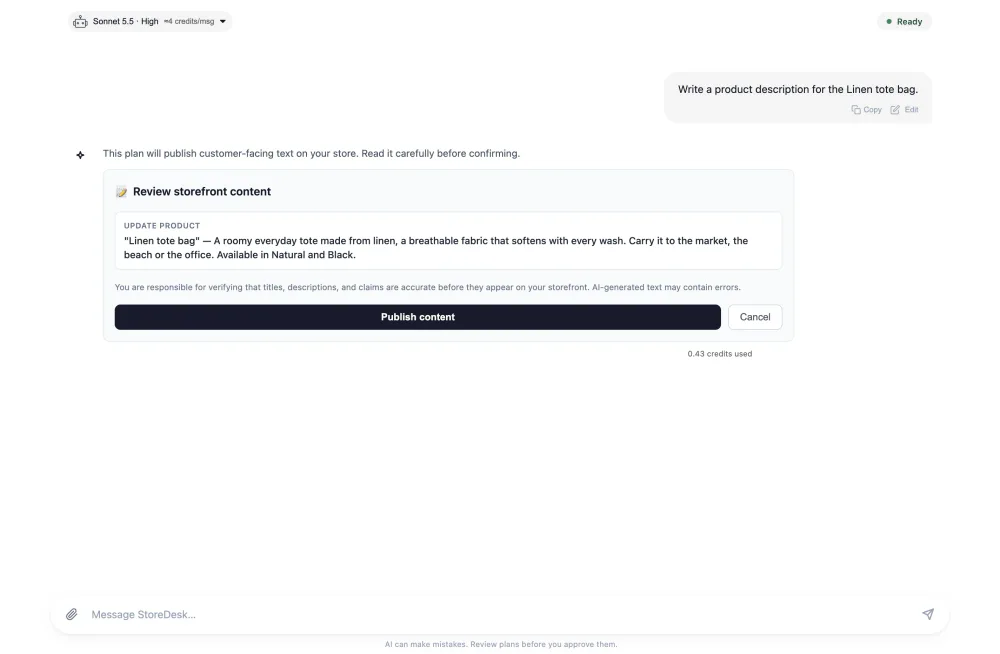
A clearer description often shows the title needs work too. Ask for both in one go, for example "Give these three products clearer titles and a short description each", and the review card lists every change before you apply it.

If you only want new titles, ask for those on their own. Each rename shows the old and new title side by side.

StoreDesk
StoreDesk review of three proposed product title changes, each showing the current title and the new one, with an Apply changes button

02How it works

How to use bulk product descriptions in 4 steps

What you ask StoreDesk, what it shows you and what you approve, in order.

  1. List the products

    Open Store Agent and name the products by exact title or handle, or give a tag they share.

  2. Add shared facts

    Type the details that apply to all of them, or attach a spec sheet.

  3. Read the review card

    Each new description sits under its product. Check every line and any warning.

  4. Publish or cancel

    Publish content saves the whole set. Cancel leaves every product as it was.

04Get started

Try bulk product descriptions on your store

Add StoreDesk to your store and ask for bulk product descriptions in plain English. Nothing changes until you approve the plan.

05FAQ

Bulk product descriptions questions

Answers to common questions about bulk product descriptions in StoreDesk.

Still have a question?

Write to us and a person answers.

How do I update many product descriptions at once?

Ask for them in one request and approve them in one review. In StoreDesk you name the products or a tag they share, it writes a description for each, and Publish content saves them all together.

Can I rewrite descriptions for a whole collection?

Yes, if you name the products or a tag or product type they share. A smart collection built on a tag is the easiest case: ask for every product with that tag. StoreDesk writes each description fresh, because it can't read the text already on a product.

How many products can I do in one request?

There's no fixed limit per request. Longer lists take longer and use more credits, and in our demo store five descriptions on the default model used about 1.1 credits. Splitting a big catalogue into groups also makes each review easier to read.

Will it overwrite my existing descriptions?

Only the ones you approve. An approved description replaces the old one, and Settings > AI change history keeps the old text with an undo button for 30 days. StoreDesk can't read the old text while writing, so paste in any lines you want it to keep.

Can it find products that have no description?

Yes. StoreDesk marks products whose description is empty, so you can ask "Write a short description for every product without one" and review the drafts in one card. It sees that a description is missing, not the text of descriptions you already have.